Build Your First MCP Server with React UX Controls

The button is the easy part. Knowing whether its request actually reached the backend is where things get interesting.
I want a small MCP App that makes that boundary visible: show submitted requests, enter a title, and submit once. No database setup. No production credentials. No magical React component that somehow appears inside every chat client.
This article combines original implementation excerpts with an official runnable React sample. The sample demonstrates the host connection; the excerpts explain how I would replace its time tool with a request workflow. They are not a complete companion application.
Documentation and package compatibility were checked on November 1, 2026. The examples target the MCP SDK v2 API, not the older @modelcontextprotocol/sdk/server/mcp.js imports.
Keep the first workflow deliberately boring
My example is a synthetic application-access request with one field: a title. It has two tools:
| Tool | Purpose | Side effect |
|---|---|---|
list_requests | Return the current list and open the request widget. | None |
create_request | Validate and submit one request, then return the updated list. | Adds one demo record |
list_requests- Purpose
- Return the current list and open the request widget.
- Side effect
- None
create_request- Purpose
- Validate and submit one request, then return the updated list.
- Side effect
- Adds one demo record
The server owns the records. React owns the unsent field and the current submission attempt. The host owns the sandbox and the connection between them.
I deliberately leave Graph permissions, approvals, and persistence out of this first example. Adding them before the tool/UI contract works makes debugging unnecessarily exciting.
Local demo only: records and retry receipts live in one process, are shared across its server instances, and disappear on restart. There is no user authentication or record-level authorization. Use throwaway data, and do not expose this request demo publicly.
An MCP tool is not a React page
The Model Context Protocol lets a client discover tools, invoke them, and read resources. MCP Apps adds a UI-resource contract and a host bridge.
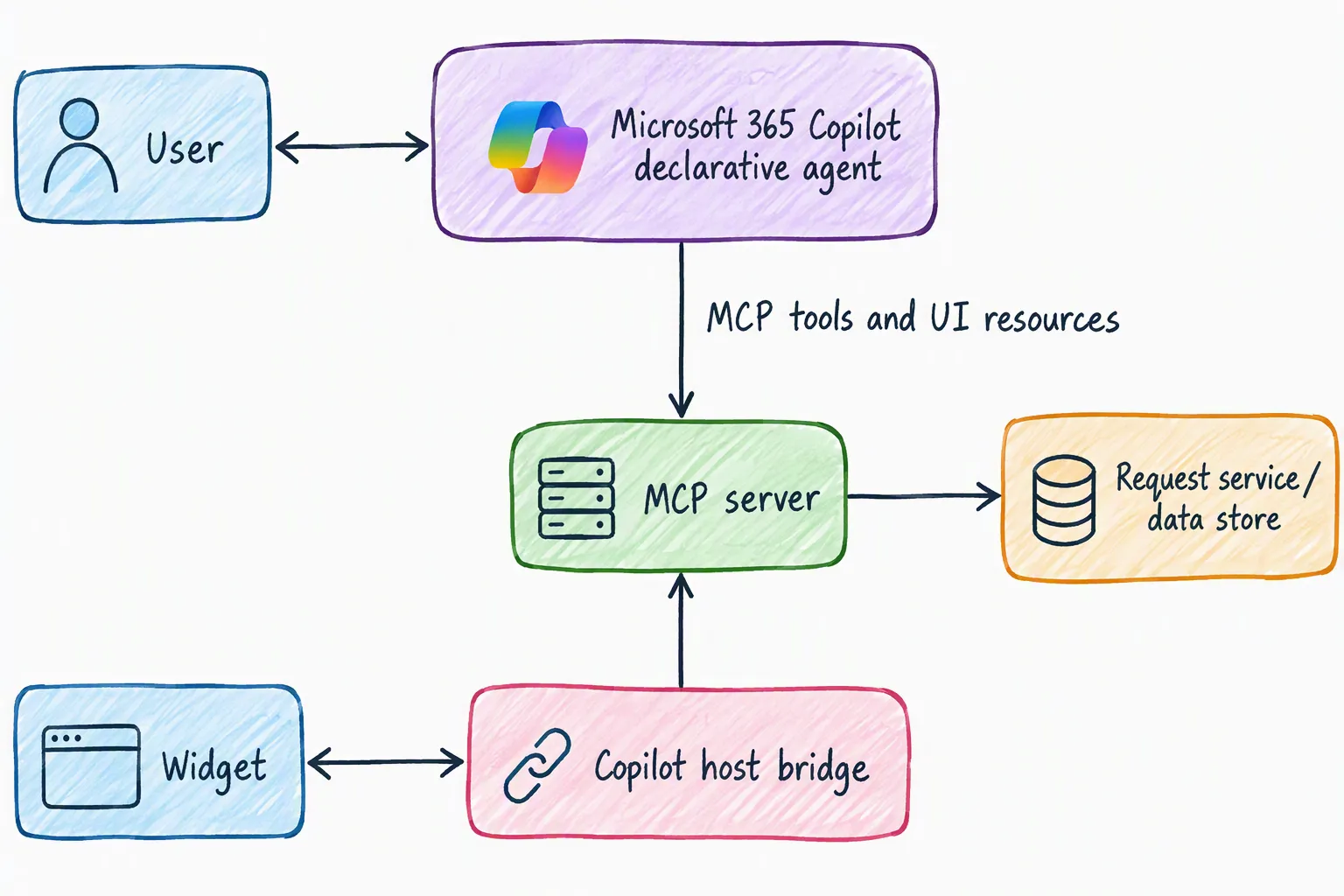
The flow I want is:
- The host discovers
list_requeststhroughtools/list. - Its descriptor links to
ui://requests/app.htmlthrough_meta.ui.resourceUri. - The host invokes the tool and reads the linked HTML resource.
- An MCP Apps-capable host renders that HTML in a sandbox and delivers the tool result.
- React calls
create_requestthroughapp.callServerToolafter the user submits.
That ui:// URI identifies an MCP resource. It is not a website address. The resource uses text/html;profile=mcp-app, and its JavaScript needs to be bundled into the HTML the host receives.
The MCP Apps overview describes this lifecycle. Microsoft’s MCP Apps documentation describes the separate integration with Microsoft 365 Copilot declarative agents.
Opening a React development page proves that React renders. An Inspector check proves something about MCP. Neither, on its own, proves that Copilot renders the widget.
Start with a shared request contract
I use the same schemas for server input validation and browser result validation. TypeScript helps during development; a runtime schema checks what actually crossed the bridge.
The following contract.ts excerpt uses Zod 4.6.7:
import { z } from "zod";

export const createRequestSchema = z.object({
  title: z.string().trim()
    .min(1, "Enter a request title.")
    .max(120, "Keep the title at 120 characters or fewer."),
  submissionId: z.string().uuid(),
}).strict();

export const requestSchema = z.object({
  id: z.string().uuid(),
  title: z.string().min(1).max(120),
  status: z.literal("submitted"),
});

export const resultSchema = z.object({
  revision: z.number().int().nonnegative(),
  requests: z.array(requestSchema),
});

export type RequestItem = z.infer<typeof requestSchema>;
export type Submission = z.infer<typeof createRequestSchema>;
The 120-character limit applies after trimming. A blank string is not a request, and extra input fields are rejected. I don’t accept a caller identity from the form and pretend it is authentication.
The demo’s revision is the number of records created. It lets the UI reject an older snapshot that arrives after a newer one. This is only meaningful within this process lifetime: restart the server and reopen the widget together. A real service needs a versioning contract that survives its actual storage and concurrency model.
Register the tools and the UI resource
This server.ts excerpt uses @modelcontextprotocol/server 2.4.0 and @modelcontextprotocol/ext-apps 2.0.4. The factory receives the already-built widget HTML; the HTTP runner, file loading, and bundler are intentionally outside this excerpt.
import { randomUUID } from "node:crypto";
import { McpServer } from "@modelcontextprotocol/server";
import {
  registerAppResource,
  registerAppTool,
  RESOURCE_MIME_TYPE,
} from "@modelcontextprotocol/ext-apps/server";
import { z } from "zod";
import {
  createRequestSchema,
  resultSchema,
  type RequestItem,
} from "./contract.js";

const requests: RequestItem[] = [];
const receipts = new Map<string, RequestItem>();
const resourceUri = "ui://requests/app.html";

function snapshot() {
  const data = resultSchema.parse({
    revision: requests.length,
    requests: [...requests],
  });
  return {
    content: [{ type: "text" as const,
      text: `${data.requests.length} submitted request(s).` }],
    structuredContent: data,
  };
}

export function createRequestServer(widgetHtml: string) {
  const server = new McpServer({
    name: "local-request-app",
    version: "1.0.0",
  });

  registerAppTool(server, "list_requests", {
    title: "Show requests",
    description: "Show the request form and submitted demo requests.",
    inputSchema: z.object({}).strict(),
    outputSchema: resultSchema,
    annotations: { readOnlyHint: true },
    _meta: { ui: { resourceUri } },
  }, async () => snapshot());

  registerAppTool(server, "create_request", {
    title: "Submit a request",
    description: "Submit a demo request with a stable retry identifier.",
    inputSchema: createRequestSchema,
    outputSchema: resultSchema,
    annotations: { readOnlyHint: false },
    _meta: { ui: { resourceUri } },
  }, async ({ title, submissionId }) => {
    const previous = receipts.get(submissionId);
    if (previous && previous.title !== title) {
      return {
        isError: true,
        content: [{ type: "text",
          text: "This submission ID already belongs to another title." }],
      };
    }

    if (!previous) {
      const request: RequestItem = {
        id: randomUUID(),
        title,
        status: "submitted",
      };
      requests.push(request);
      receipts.set(submissionId, request);
    }
    return snapshot();
  });

  registerAppResource(server, "Request widget", resourceUri, {
    mimeType: RESOURCE_MIME_TYPE,
  }, async () => ({
    contents: [{
      uri: resourceUri,
      mimeType: RESOURCE_MIME_TYPE,
      text: widgetHtml,
    }],
  }));

  return server;
}
There is a useful detail here: the arrays and receipts are outside the factory. The official HTTP sample creates a server instance per HTTP request. Putting the demo store inside that factory would lose the previous tool call’s records.
The SDK validates tool arguments against the input schema. Successful results follow the output schema; a business conflict returns an explicit tool error rather than a success-shaped empty list.
A retry is the same operation, not another click
The submission identifier belongs to the logical request. Reusing it with the same normalized title returns a snapshot without creating another record. Reusing it with a different title fails.
Two different identifiers with the same title are two requests. That is intentional: a title is not an idempotency key.
This synchronous in-process check is enough for this synthetic demo. It is not a distributed locking strategy. Production needs durable, atomic receipt storage, a payload-conflict check, and keys scoped to the authenticated caller, tenant, and operation. Define retention and behavior after receipt expiry, too.
I also wouldn’t mistake readOnlyHint for permission. A model or another MCP client can call the write tool without pressing this particular form’s button. Real writes need backend authorization and the host’s applicable consent flow.
Wire React through the host bridge
Here is a minimal RequestApp.tsx excerpt using React 19.3.1 and the same MCP Apps package. The HTML entry point still needs to mount this component, and the bundler needs to include its shared contract.
import { useRef, useState, type FormEvent } from "react";
import { useApp } from "@modelcontextprotocol/ext-apps/react";
import {
  createRequestSchema,
  resultSchema,
  type RequestItem,
  type Submission,
} from "./contract.js";

function errorText(error: unknown) {
  return error instanceof Error ? error.message : String(error);
}

export function RequestApp() {
  const [requests, setRequests] = useState<RequestItem[] | null>(null);
  const [title, setTitle] = useState("");
  const [pending, setPending] = useState(false);
  const [failure, setFailure] = useState("");
  const [message, setMessage] = useState("");
  const attempt = useRef<Submission | null>(null);
  const busy = useRef(false);
  const revision = useRef(-1);

  function acceptSnapshot(value: unknown) {
    const parsed = resultSchema.safeParse(value);
    if (!parsed.success) throw new Error("Invalid request-list result.");
    if (parsed.data.revision < revision.current) return;
    revision.current = parsed.data.revision;
    setRequests(parsed.data.requests);
  }

  const { app, isConnected, error } = useApp({
    appInfo: { name: "request-widget", version: "1.0.0" },
    capabilities: {},
    onAppCreated(app) {
      app.ontoolresult = (result) => {
        try {
          if (result.isError) throw new Error("The host tool call failed.");
          acceptSnapshot(result.structuredContent);
          setFailure("");
        } catch (error) {
          setFailure(errorText(error));
        }
      };
    },
  });

  async function submit(event: FormEvent<HTMLFormElement>) {
    event.preventDefault();
    if (busy.current) return;
    if (!app || !isConnected || requests === null) {
      setFailure("Wait for the host connection and request list.");
      return;
    }

    const parsed = createRequestSchema.safeParse(attempt.current ?? {
      title,
      submissionId: crypto.randomUUID(),
    });
    if (!parsed.success) {
      setFailure(parsed.error.issues.map((issue) => issue.message).join(" "));
      return;
    }

    attempt.current = parsed.data;
    busy.current = true;
    setPending(true);
    setFailure("");
    setMessage("");
    try {
      const result = await app.callServerTool({
        name: "create_request",
        arguments: { ...attempt.current },
      });
      if (result.isError) {
        const text = result.content
          .filter((item) => item.type === "text")
          .map((item) => item.text).join(" ");
        throw new Error(text || "Request submission failed.");
      }
      acceptSnapshot(result.structuredContent);
      attempt.current = null;
      setTitle("");
      setMessage("Request submitted.");
    } catch (error) {
      setFailure(errorText(error));
    } finally {
      busy.current = false;
      setPending(false);
    }
  }

  return (
    <section aria-label="Requests">
      {requests === null && <p>Waiting for the host's first tool result.</p>}
      {requests?.length === 0 && <p>No submitted requests yet.</p>}
      <ul>{requests?.map((request) => (
        <li key={request.id}>{request.title} - {request.status}</li>
      ))}</ul>
      <form onSubmit={submit}>
        <label htmlFor="request-title">Request title</label>
        <input id="request-title" value={title} required maxLength={120}
          aria-describedby="request-help"
          disabled={!isConnected || pending || attempt.current !== null}
          onChange={(event) => setTitle(event.target.value)} />
        <p id="request-help">Use a short title. Demo data only.</p>
        <button type="submit"
          disabled={!isConnected || requests === null || pending}>
          {attempt.current ? "Retry same request" : "Submit request"}
        </button>
      </form>
      <p role="status">{pending ? "Submitting request..." : message}</p>
      {(failure || error) && <p role="alert">{failure || error?.message}</p>}
    </section>
  );
}
I register ontoolresult in onAppCreated, before the bridge connects, so the first result has a handler. The hook’s initialization options are not a subscription to every render; these callbacks use state setters and refs rather than relying on changing captured state.
null means the initial list has not arrived. An empty array means it arrived and contains no requests. That distinction stops a disconnected widget from looking like a successfully loaded empty list.
The ref blocks rapid duplicate submissions before React has rendered the disabled button. After a failed or uncertain call, the field stays locked and the retry uses the same payload and identifier. A timeout is not proof that the server rejected the write.
This deliberately small form has no “abandon uncertain request” action. A production UI should reconcile the operation with the backend before offering a reset. The retry identifier here also disappears when the widget reloads; persist and recover it appropriately before relying on this behavior for real writes.
Microsoft lists app.ontoolresult and app.callServerTool as supported Copilot bridge capabilities. That does not imply support for every MCP Apps API: for example, its current table marks app.ontoolcancelled and the OpenAI file-upload bridge APIs unsupported.
Run an actual local MCP Apps baseline
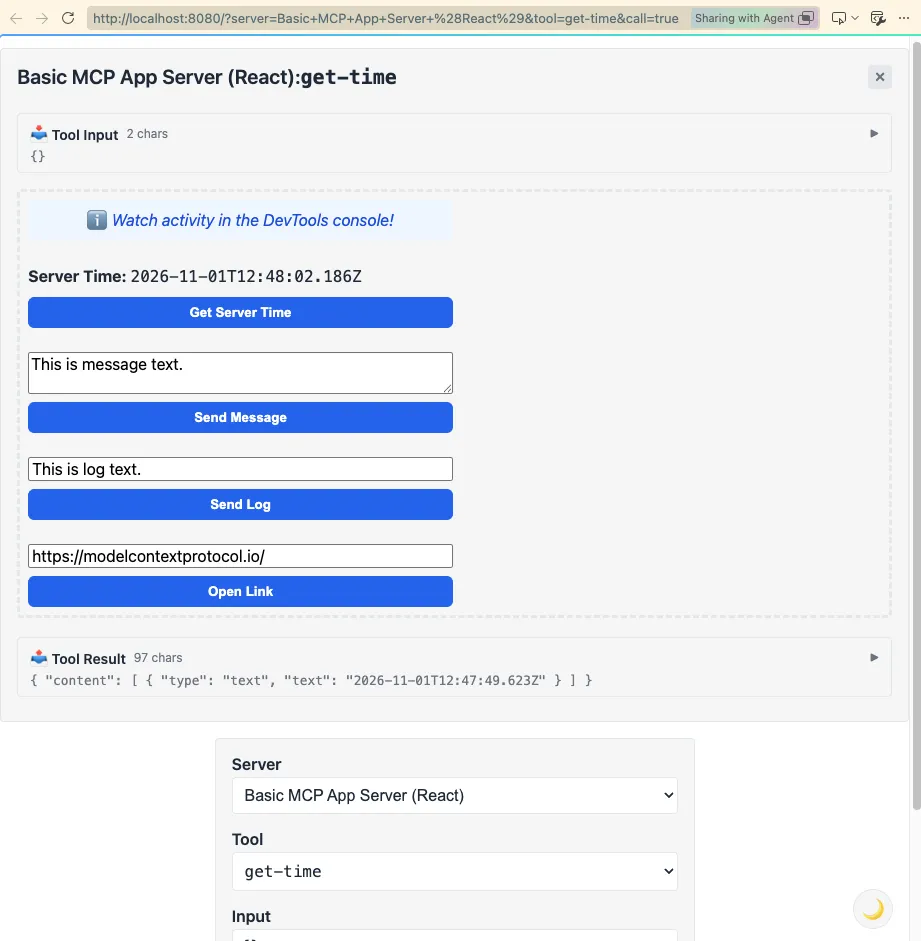
For a runnable starting point, I use the official basic React server and basic host from the MCP Apps repository.
The baseline runs get-time, not the request excerpts above. It establishes that tool discovery, resource loading, HTML bundling, and the host bridge work before changing the business behavior.
Use Git, npm, Node.js 20 or later, and Bun. I checked with Node.js 24.21.0 and Bun 1.4.4. Bun is required by this sample’s build and server scripts; it is not a requirement of MCP itself.
The following checkout pins the researched revision instead of silently following changes on main:
git clone https://github.com/modelcontextprotocol/ext-apps.git
cd ext-apps
git checkout --detach cf599cc462406accc90ec3ca7879e3a22a9fc2a8
cd examples/basic-server-react
npm install --workspaces=false
npm run start --workspaces=false
In a second terminal, from the cloned repository:
cd examples/basic-host
npm install --workspaces=false
npm install --save-dev @types/cors@2.8.19 cross-env@10.1.0 --workspaces=false
npm run start --workspaces=false
At this revision, the isolated host example is missing the @types/cors and cross-env development dependencies; the extra install fixes its TypeScript check and build command. start builds before serving. The React server’s dev script starts watchers, but I prefer a successful first build before using it. --workspaces=false keeps npm scoped to the individual example rather than installing or running the whole repository workspace.
The MCP endpoint is http://localhost:3001/mcp. Open the local host at http://localhost:8080; its sandbox proxy uses port 8081. Choose the server’s get-time tool and invoke it to render the widget.
The React server uses Vite and vite-plugin-singlefile to produce the HTML UI resource. Its HTTP runner uses the Node Streamable HTTP transport. Copying npm run dev from the blog’s Astro project would not start any of that.
Inspect the development server before exposing it. At this revision the sample binds to 0.0.0.0 and enables broad CORS. That is development plumbing, not a production security configuration. The MCP transport security guidance recommends local-only binding, Origin validation, and authentication.
Also check the negotiated protocol version. The July 2026 Streamable HTTP revision removed the older GET stream endpoint and protocol-level sessions; sample and host code may target earlier revisions. A working sample is evidence for its tested combination, not universal compatibility.
Adapting the baseline to the request scenario
Keep the official transport and single-file bundling setup. Add the shared contract, mount RequestApp in the HTML entry point, and change the server factory to supply its built HTML to createRequestServer.
Adjust the source-versus-built HTML path as the sample does. A Vite page served separately is not the same thing as an HTML resource returned by resources/read.
I would verify the factory through an in-memory MCP client first, then test the adapted widget in the local host. MCP Inspector is useful for checking tools/list, argument validation, and resources/read independently. Do not count an Inspector-only check as a rendered Copilot widget.
Move to Microsoft 365 Copilot without confusing the boundaries
The local host is a test harness, not Microsoft 365 Copilot. Copilot’s remote service cannot simply use the localhost address on my laptop.
Microsoft’s declarative-agent MCP walkthrough and MCP Apps setup guidance cover the actual integration:
- Use Microsoft 365 Agents Toolkit 6.12.0 or later and an account with the required Copilot access and custom-app upload policy.
- Create a declarative agent, add an action, and choose Start with MCP Server.
- Provide a reachable HTTPS MCP endpoint and supported authentication.
- Provision the development agent and open it in Microsoft 365 Copilot Chat.
- Ask it to invoke the UI-linked tool, allow the connection when prompted, and inspect the rendered widget.
The default dynamic-discovery flow resolves tools from the server at runtime. It does not require manually duplicating every tool schema in the agent package.
Microsoft dev tunnels can make a local endpoint reachable, but they are authenticated to the tunnel owner by default. That browser sign-in barrier is not automatically usable by Copilot’s server-side MCP connection. Work out both tunnel access and MCP authentication; don’t solve it by publishing an unauthenticated write demo.
For an authenticated widget, follow Microsoft’s MCP Apps authentication and CORS guidance. The widget’s allowed origin is server-domain-specific; Microsoft supplies a widget URL generator. CORS controls browser access. It does not identify or authorize the caller.
Microsoft’s current guidance also notes that VS Code tool fetching does not support Entra SSO. A failure there is not enough to conclude that the Copilot runtime’s authentication configuration is broken.
If the widget does not appear, use the MCP Apps troubleshooting guide. In Copilot, developer diagnostics can be enabled with:
-developer onCheck the endpoint response, discovered tool metadata, UI resource MIME type, CSP, authentication, and bridge connection separately. A giant “widget failed” bucket makes a small problem look bigger than it is.
What I verify before calling this done
For the request excerpts:
- An empty list is a successful, schema-valid result, not an exception.
- A valid title creates one record and returns its identifier.
- Whitespace-only input, more than 120 normalized characters, extra fields, and invalid submission identifiers fail.
- Repeating the same identifier and title does not create another record.
- Reusing the identifier with another title returns a visible conflict.
- Separate server instances share this process’s store; restarting does not preserve it.
- Invalid bridge results, tool errors, and rejected calls produce visible error states.
- A failed submission retains its identifier and payload for retry.
- Older list snapshots do not overwrite newer ones.
For the host, I additionally check keyboard navigation, focus after submission, narrow-width layout, theme contrast, and behavior when the host does not support MCP Apps. Labels and live-region markup are a starting point, not an accessibility certification.
The actual MDX excerpts passed TypeScript checks, in-memory MCP tests, and simulated React bridge tests covering the states above. The official baseline also passed HTTP tool/resource checks and a browser test: the local host rendered its sandboxed React widget, and the widget’s Get Server Time button updated the displayed time.
These checks do not establish a live Microsoft 365 Copilot session, tenant permissions, production authentication, or a deployed request service.
Takeaway
I want the first app to be boring in the right places: a small contract, one visible write action, and an honest result.
Get the official local host and React sample working. Then replace the time tool with the request tools, keeping validation and retry semantics on the server. Only after that would I add real identities, durable storage, and a Copilot development endpoint.
The interesting part is not getting a button into chat. It is making the button mean something predictable.
Official references
- MCP Apps overview and lifecycle
- Official React server and build scripts
- Official local MCP Apps host
- MCP Apps in Microsoft 365 Copilot
- Build a declarative agent with an MCP plugin
- Troubleshoot MCP Apps in Copilot
- Plugin authentication
- Create and host a Microsoft dev tunnel
- Microsoft’s interactive MCP UI samples